Understanding Storage Bin Labels
In the realm of inventory management, storage bin labels play a pivotal role in keeping warehouses, offices, and retail spaces organized. With the growing demands of modern businesses, tools like TapNota have redefined how organizations approach labeling and tracking, ensuring efficiency and accuracy throughout the process. This guide explores storage bin labels, their benefits, how to implement them effectively, and how digital solutions are changing the landscape.
What Are Storage Bin Labels?
Storage bin labels are identifiers attached to bins, shelves, or containers to designate their contents or location. These labels can be as simple as handwritten tags or as sophisticated as barcoded and RFID-enabled markers. Their main purpose is to facilitate quick identification, streamline inventory control, and reduce errors in picking, stocking, and shipping processes.
Common Types of Storage Bin Labels
- Paper Labels: Cost-effective and easy to produce, but may wear out quickly.
- Plastic Labels: Durable, water-resistant, and suitable for long-term use.
- Magnetic Labels: Reusable and ideal for metal shelving units.
- Barcode & QR Code Labels: Enable digital tracking and integration with inventory management systems.
- RFID Labels: Allow wireless scanning and are used for high-volume, fast-paced environments.
The Benefits of Effective Storage Bin Labeling
Implementing a consistent labeling system for storage bins offers several advantages:
- Enhanced Organization: Items are easier to locate, reducing time spent searching for products.
- Improved Accuracy: Clear labels minimize picking and stocking errors.
- Faster Inventory Counts: Staff can quickly identify and count products, improving efficiency.
- Streamlined Training: New employees can adapt faster to organized storage systems.
- Better Space Utilization: Labeled bins help maximize storage efficiency.
How TapNota Modernizes Storage Bin Labeling
Traditional labeling methods rely heavily on manual processes, which can be prone to human error. TapNota introduces a digital approach by integrating storage bin labels with inventory management software. This fusion enables seamless tracking, real-time updates, and data-driven decision-making.
TapNota vs. Traditional Inventory Tracking
Comparing TapNota’s digital system with conventional methods highlights the evolution in inventory management. Traditional tracking often involves spreadsheets, handwritten notes, or basic barcode systems, all of which require manual data entry and frequent audits. TapNota streamlines these processes by offering automated tracking, cloud-based data storage, and easy label generation.
For a detailed comparison, visit TapNota vs. traditional inventory tracking to understand the key differences.
Implementing Storage Bin Labels with TapNota
Step-by-Step Guide
- Assess Your Inventory: Begin by categorizing items and determining storage needs.
- Choose the Right Labels: Decide between paper, plastic, magnetic, or digital labels based on your environment.
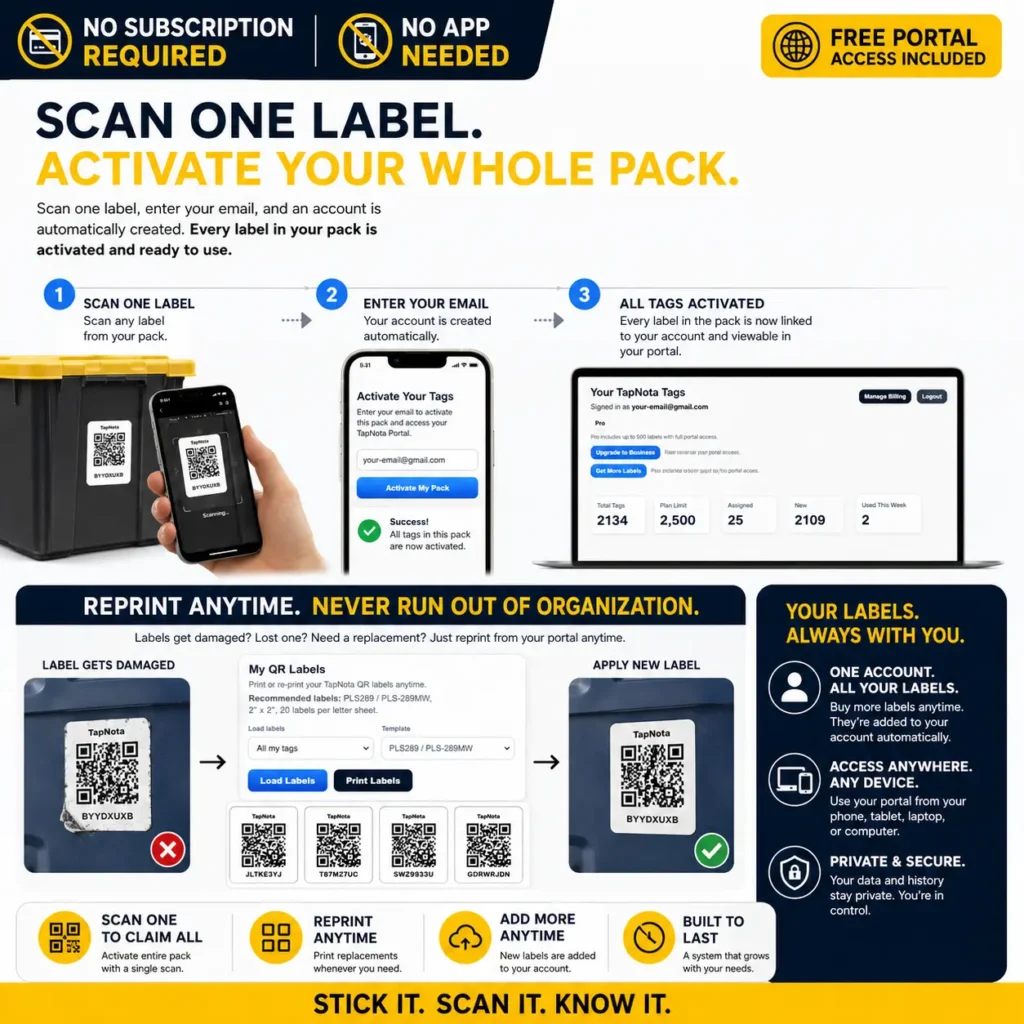
- Design Labels: Use TapNota’s label generator to create clear, scannable labels with barcodes or QR codes.
- Apply Labels: Attach labels to bins in visible locations, ensuring they are secure and legible.
- Integrate with Software: Link each label to your digital inventory using TapNota inventory management software.
- Train Staff: Educate team members on scanning labels and updating inventory records.
- Monitor and Update: Regularly audit bins and update labels as inventory changes.
Best Practices for Storage Bin Labeling
- Use large, legible fonts and contrasting colors for visibility.
- Include both text and barcodes for flexibility in manual and digital environments.
- Standardize label placement across all bins.
- Utilize sequential numbering or location codes for logical organization.
- Regularly check for damaged or outdated labels and replace as needed.
How Digital Solutions Transform Labeling
With advancements in technology, storage bin labels are no longer static. Using platforms like TapNota, businesses can dynamically update label information, track assets in real-time, and generate reports instantly. This digital transformation reduces manual errors and enhances productivity.
Features of TapNota’s Inventory Management Software
- Automated label generation with barcode or QR code integration
- Cloud-based inventory tracking accessible from any device
- Real-time stock updates and notifications
- Customizable reporting and analytics
- Seamless integration with asset tracking systems
Learn more about these features at TapNota inventory management software.
Industry Applications of Storage Bin Labels
Storage bin labels are essential across multiple industries. Here’s how different sectors benefit:
| Industry | Benefits of Storage Bin Labels | TapNota Application |
|---|---|---|
| Warehousing | Speed up picking and restocking, reduce misplaced items | Barcode and QR code labels linked to TapNota for real-time updates |
| Retail | Improve shelf organization, streamline stock takes | Dynamic labels for seasonal and promotional inventory |
| Healthcare | Enhance traceability of medical supplies and equipment | RFID labels tracked with TapNota’s asset tracking system |
| Manufacturing | Track raw materials, work-in-progress, and finished goods | Automated inventory levels and alerts with TapNota |
Integrating Storage Bin Labels with Asset Tracking
Asset tracking is integral to inventory management. By linking storage bin labels with an asset tracking system, businesses can monitor the movement, location, and status of equipment and inventory. TapNota’s solution allows organizations to assign unique identifiers to each bin and asset, ensuring traceability from procurement to disposal.
Advantages of Integrated Asset Tracking
- Reduced Loss: Track assets in real-time to minimize loss or theft.
- Maintenance Scheduling: Schedule regular checks and maintenance for equipment stored in labeled bins.
- Compliance: Maintain accurate records for audits and regulatory requirements.
Discover the benefits of integration at TapNota asset tracking system.
Case Study: Using TapNota for Storage Bin Labeling
Consider a medium-sized distribution center that struggled with misplaced inventory and inefficient stock checks. By adopting TapNota, the facility implemented barcode labels on all storage bins, integrated with TapNota’s cloud-based inventory management platform. Staff used mobile devices to scan bins during picking, stocking, and audits, reducing errors and streamlining operations.
Read more about real-world implementations at using TapNota.
Choosing the Right Storage Bin Labeling System
When selecting a labeling solution, businesses should consider:
- Volume of Inventory: High-volume operations benefit from automated, scannable labels.
- Environmental Factors: Choose durable materials for harsh or wet environments.
- Integration Needs: Opt for systems that sync with existing inventory and asset tracking platforms.
- Budget: Balance initial costs with long-term savings from increased efficiency.
Maintaining and Updating Storage Bin Labels
As inventory evolves, so should your labeling system. TapNota makes it easy to update label data, retire old bins, and introduce new categories. Regular audits and digital updates prevent confusion and ensure ongoing accuracy.
Label Maintenance Checklist
- Inspect labels for wear or damage every quarter
- Update digital records to match any physical changes
- Replace faded or illegible labels promptly
- Train staff on new labeling procedures
Why TapNota Stands Out for Storage Bin Labels
TapNota’s approach to storage bin labels combines physical labeling with advanced inventory and asset tracking software. The platform supports a variety of labeling formats, integrates with mobile devices, and provides actionable insights through analytics. Businesses can reduce manual tasks, improve accuracy, and adapt quickly to changing inventory needs.
Learn more about implementation and features at using TapNota.